导图社区 通讯录数据库开发编程学习笔记
通讯录数据库开发编程学习笔记:int _id=Integer.parseInt(map.get("id").toString());String display_name=map.get("display_name").toString()。
编辑于2022-11-10 17:55:39 广东通讯录数据库开发编程学习笔记
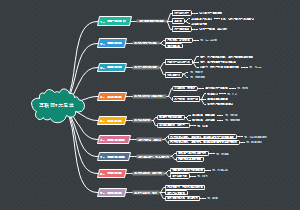
系统自带通讯录数据
数据库文件所在位置
/data/data
重点关心contacts2.db中的表
查找表
Raw_contacts查找姓名
select _id,display_name from raw_contacts;
Data查找号码
select _id,mimetype_id,raw_contact_id,data1 from data;
Mimetypes查找响应码
select * from mimetypes
所有联系的电话
select raw_contact_id,mimetype_id,data1 from data d,mimetypes m
where d.mimetype_id=m._id and m._id=5;
通讯录进行增删改查
xml
mian初始化
orientation="vertical"
list_tem显示
text4个
update操作
EditText :hint
mainFast
注册权限
读取手机联系人
uses-permission android:name="android.permission.READ_CONTACTS"/>
向手机联系人中写入数据
修改联系人的Activity
android:label="修改联系人"></activity>
mainActivity
声明
控件
listView_contacts
button_add
button_update
适配器
List<Map<String,Object>> data
SimpleAdapter adapter
通讯录
uri_contacts = "content://com.android.contacts/raw_contacts";
uri_contacts_phones = "content://com.android.contacts/data/phones";
uri_contacts_emails = "content://com.android.contacts/data/emails";
uri_contacts_data = "content://com.android.contacts/data"
ContentResolver contentResolver
得到内容解析者对象
this.contentResolver=this.getContentResolver();
initView()
listView_contacts
this.listView_contacts.setOnItemClickListener
onItemClick
Map<String,Object> map=data.get(position);
int _id=Integer.parseInt(map.get("id").toString());
String display_name=map.get("display_name").toString();
Intent intent=new Intent(getApplicationContext(),UpdateContactActivity.class);
intent.putExtra("id",_id);
intent.putExtra("display_name",display_name);
startActivity(intent);
适配器
获得数据源getData()
1、先清空数据
data.clear();
2、通过contentResolver获得游标数据
Cursor cursor_raw_contacts=this.contentResolver.query(Uri.parse(uri_contacts), new String[]{"_id","display_name"}, null, null, "_id DESC");
3、遍历游标
while(cursor_raw_contacts.moveToNext()){
获得id,name
Map<String,Object> map=new HashMap<String,Object>();
int _id=cursor_raw_contacts.getInt(cursor_raw_contacts.getColumnIndex("_id"));
String display_name=cursor_raw_contacts.getString(cursor_raw_contacts.getColumnIndex("display_name"));
map.put("id",_id);
map.put("display_name",display_name);
取电话号码
Cursor cursor_phone=this.contentResolver.query(Uri.parse(uri_contacts_phones), new String[]{"raw_contact_id", "data1"}, "raw_contact_id=?", new String[]{String.valueOf(_id)}, null);
StringBuilder sb_phones=new StringBuilder();
while(cursor_phone.moveToNext()){
String phone=cursor_phone.getString(cursor_phone.getColumnIndex("data1"));
sb_phones.append(phone+" | ");
//如果没有数据,不要删除|
if(sb_phones.length()>0){
//删除最后多余的|
sb_phones.deleteCharAt(sb_phones.length()-2);
map.put("phones", sb_phones);
//如果没有数据,不要删除|
if(sb_emails.length()>0){
//删除最后多余的|
sb_emails.deleteCharAt(sb_emails.length()-2);
data.add(map);
取email
Cursor cursor_email=this.contentResolver.query(Uri.parse(uri_contacts_emails), new String[]{"raw_contact_id", "data1"}, "raw_contact_id=?", new String[]{String.valueOf(_id)}, null);
StringBuilder sb_emails=new StringBuilder();
while(cursor_email.moveToNext()){
String email=cursor_email.getString(cursor_email.getColumnIndex("data1"));
sb_emails.append(email+" | ");
map.put("emails", sb_emails);
setOnItemLongClickListener
查询刷新数据,自定义select()
private void select() {
this.data=this.getData();
adapter=this.getAdapter();
this.listView_contacts.setAdapter(adapter);
获得适配器getAdapter()
根据联系人姓名删除通讯记录
deleteContactsByDisplayName()
int count=this.contentResolver.delete
(Uri.parse(uri_contacts), "display_name=?", new String[]{display_name});
return count>0;
UpdateContactActivity
通话记录
布局
main
ListView
call_item
3text
注册权限
读取通话记录
"android.permission.READ_CALL_LOG"
MainActivity
声明
listView_callLog
SimpleCursorAdapter adapter
cursor
contentResolver
获得内容解析者
getContentResolver();
初始化listView_callLog
findViewById
自定义适配器
this.adapter=this.getAdapter();
private SimpleCursorAdapter getAdapter() {
this.cursor=this.getCursor();
this.adapter=new SimpleCursorAdapter(this, R.layout.calllog_item,
this.cursor,
new String[]{"number","type","date"},
new int[]{R.id.textView_number,R.id.textView_type,R.id.textView_date},
CursorAdapter.FLAG_REGISTER_CONTENT_OBSERVER){
public View getView(int position, View convertView,
ViewGroup parent) {
View view=super.getView(position, convertView, parent);
TextView textView_type=(TextView) view.findViewById(R.id.textView_type);
获得控件
String strType=textView_type.getText().toString().trim();
int type=Integer.parseInt(strType);
获得控件type内容
switch (type) 修改type{
case 1:
textView_type.setText("接听电话");
break;
case 2:
textView_type.setText("呼出电话");
break;
case 3:
textView_type.setText("未接电话");
break;
default:
break;
修改日期
TextView textView_date=(TextView) view.findViewById(R.id.textView_date);
String strDate=textView_date.getText().toString().trim();
long lDate=Long.parseLong(strDate);
SimpleDateFormat simpleDateFormat=new SimpleDateFormat("yyyy-MM-dd HH:mm:ss");
Date date=new Date(lDate);
strDate=simpleDateFormat.format(date);
textView_date.setText(strDate);
return view;
getCursor
this.contentResolver.query
适配器显示数据
this.listView_callLog.setAdapter(adapter);
短信记录
布局
main
ListView
msm_item
3text
注册权限
读取信息记录
"android.permission.READ_SMS"
MainActivity
声明
listView_callLog
SimpleCursorAdapter adapter
cursor
contentResolver
获得内容解析者
getContentResolver();
初始化listView_sms
findViewById
自定义适配器
this.adapter=this.getAdapter();
private SimpleCursorAdapter getAdapter() {
this.cursor=this.getCursor();
public View getView(int position, View convertView,
ViewGroup parent) {
View view=super.getView(position, convertView, parent);
TextView textView_type=(TextView) view.findViewById(R.id.textView_type);
获得控件
String strType=textView_type.getText().toString().trim();
int type=Integer.parseInt(strType);
获得控件type内容
switch (type) 修改type{
case 1:
textView_type.setText("接收短信");
break;
case 2:
textView_type.setText("发送短信");
break;
default:
break;
修改日期
TextView textView_date=(TextView) view.findViewById(R.id.textView_date);
String strDate=textView_date.getText().toString().trim();
long lDate=Long.parseLong(strDate);
SimpleDateFormat simpleDateFormat=new SimpleDateFormat("yyyy-MM-dd HH:mm:ss");
Date date=new Date(lDate);
strDate=simpleDateFormat.format(date);
textView_date.setText(strDate);
return view;
this.adapter=new SimpleCursorAdapter(this, R.layout.sms_item,
this.cursor,
new String[]{"address","body","type","date"},
new int[]{R.id.textView_address,R.id.textView_body,R.id.textView_type,R.id.textView_date},
CursorAdapter.FLAG_REGISTER_CONTENT_OBSERVER)
getCursor
this.contentResolver.query
适配器显示数据
this.listView_callLog.setAdapter(adapter);