导图社区 Angular
- 52
- 1
- 0
- 举报
Angular
关于Angular的思维导图,分享了 API 、组件与模板、RxJS、依赖注入、表单、路由的知识,欢迎大家学习。
编辑于2023-05-19 11:52:44 湖南
- 相似推荐
- 大纲

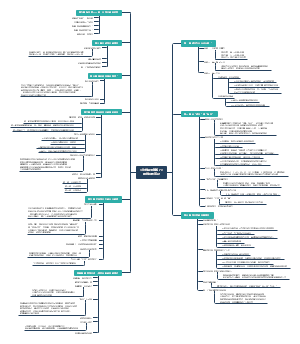

Angular
API
@angular/core <br>
【@】ViewChild 配置视图查询
所支持的选择器包括: 任何带有 @Component 或 @Directive 装饰器的类 字符串形式的模板引用变量(比如可以使用 @ViewChild('cmp') 来查询 <my-component #cmp></my-component> 组件树中任何当前组件的子组件所定义的提供商(比如 @ViewChild(SomeService) someService: SomeService ) 任何通过字符串令牌定义的提供商(比如 @ViewChild('someToken') someTokenVal: any ) TemplateRef(比如可以用 @ViewChild(TemplateRef) template; 来查询 <ng-template></ng-template>) ``` import {AfterViewInit, Component, Directive, ViewChild} from '@angular/core'; @Directive({selector: 'child-directive'}) class ChildDirective { } @Component({selector: 'someCmp', templateUrl: 'someCmp.html'}) class SomeCmp implements AfterViewInit { // TODO(issue/24571): remove '!'. @ViewChild(ChildDirective) child !: ChildDirective; ngAfterViewInit() { // child is set } } ```
【C】ChangeDetectorRef 变更检测
``` class DataListProvider { // in a real application the returned data will be different every time get data() { return [1, 2, 3, 4, 5]; } } @Component({ selector: 'giant-list', template: ` <li *ngFor="let d of dataProvider.data">Data {{d}}</li> `, }) class GiantList { constructor(private ref: ChangeDetectorRef, private dataProvider: DataListProvider) { ref.detach(); setInterval(() => { this.ref.detectChanges(); }, 5000); } } @Component({ selector: 'app', providers: [DataListProvider], template: ` <giant-list></giant-list> `, }) class App { } ```
detectChanges(): 检查视图及其子视图是否变更, 重新渲染视图
detach(): 分离视图,组件不再变更检测,更新视图
【C】ElementRef 可以渲染的原生元素<br>
nativeElement:原生元素,直接访问宿主DOM
```ts import { Directive, ElementRef } from '@angular/core'; @Directive({ selector: '[appHighlight]' }) export class HighlightDirective { constructor(el: ElementRef) { el.nativeElement.style.backgroundColor = 'yellow'; } } ``` ```html <p appHighlight>Highlight me!</p> ```
【C】TemplateRef
### 说明 通过把一个指令放在 <ng-template> 元素(或一个带 * 前缀的指令)上,可以访问 TemplateRef 的实例。 内嵌视图的 TemplateRef 实例会以 TemplateRef 作为令牌,注入到该指令的构造函数中。 你还可以使用 Query 来找出与某个组件或指令相关的 TemplateRef。 ### 示例 ``` @Directive({ selector: '[appUnless]'}) export class UnlessDirective { private hasView = false; constructor( private templateRef: TemplateRef<any>, private viewContainer: ViewContainerRef) { } @Input() set appUnless(condition: boolean) { if (!condition && !this.hasView) { this.viewContainer.createEmbeddedView(this.templateRef); this.hasView = true; } else if (condition && this.hasView) { this.viewContainer.clear(); this.hasView = false; } } } ``` ``` <ng-template [appUnless]="condition"> <p class="code unless"> (A) <ng-template [appUnless]="condition"> </p> </ng-template> ```
【C】ViewContainerRef <br>
``` import { Component, ViewContainerRef, OnInit, ViewChild, ElementRef } from '@angular/core'; import { Hero, heroes } from './hero'; @Component({ selector: 'app-root', templateUrl: './app.component.html', styleUrls: ['./app.component.css'] }) export class AppComponent implements OnInit { context = { $implicit: 'World', name: 'liyq' } @ViewChild('tpl01') tpl: ElementRef; constructor( private vr: ViewContainerRef ) { } ngOnInit() { // 实例化一个内嵌视图,并把它插入到该容器中。 this.vr.createEmbeddedView(this.tpl, { name: 'nihao' }); this.vr.get(0); // this.vr.clear(); } } ``` ``` <ng-container *ngTemplateOutlet="tpl01; context: context"></ng-container> <ng-template #tpl01 let-name="name"> <h2>this is tpl01{{ name }}</h2> </ng-template> ```
clear():清除容器内所有视图
createEmbeddedView():容器中中插入一个视图
get():根据索引获取一个视图
@angular/common <br>
【P】CurrencyPipe
```JS @Component({ selector: 'currency-pipe', template: `<div> <!--output '$0.26'--> <p>A: {{a | currency}}</p> <!--output 'CA$0.26'--> <p>A: {{a | currency:'CAD'}}</p> <!--output 'CAD0.26'--> <p>A: {{a | currency:'CAD':'code'}}</p> <!--output 'CA$0,001.35'--> <p>B: {{b | currency:'CAD':'symbol':'4.2-2'}}</p> <!--output '$0,001.35'--> <p>B: {{b | currency:'CAD':'symbol-narrow':'4.2-2'}}</p> <!--output '0 001,35 CA$'--> <p>B: {{b | currency:'CAD':'symbol':'4.2-2':'fr'}}</p> <!--output 'CLP1' because CLP has no cents--> <p>B: {{b | currency:'CLP'}}</p> </div>` }) export class CurrencyPipeComponent { a: number = 0.259; b: number = 1.3495; } ```
【P】DatePipe
``` {{ dateObj | date }} // output is 'Jun 15, 2015' {{ dateObj | date:'medium' }} // output is 'Jun 15, 2015, 9:43:11 PM' {{ dateObj | date:'shortTime' }} // output is '9:43 PM' {{ dateObj | date:'mmss' }} // output is '43:11' {{ dateObj | date:'yyyy-MM-dd' }} // output is '2018-05-09' ```
【P】DecimalPipe
{{ value_expression | number [ : digitsInfo [ : locale ] ] }} ``` ### 参数说明 digitsInfo string 数字展现的选项,通过如下格式的字符串指定: {minIntegerDigits}.{minFractionDigits}-{maxFractionDigits}。 minIntegerDigits:在小数点前的最小位数。默认为 1。 minFractionDigits:小数点后的最小位数。默认为 0。 maxFractionDigits:小数点后的最大为数,默认为 3。 可选. 默认值是 undefined. locale string 要使用的本地化格式代码。 如果未提供,则使用 LOCALE_ID 的值,默认为 en-US。 参见为你的应用设置地区(locale)。 可选. 默认值是 undefined. ```
【P】PercentPipe <br>
把数字转换成百分比字符串, 根据本地化规则进行格式化,这些规则会决定分组大小和分组分隔符、小数点字符以及其它与本地化环境有关的配置项
【D】NgTemplateOutlet
``` @Component({ selector: 'ng-template-outlet-example', template: ` <ng-container *ngTemplateOutlet="greet"></ng-container> <hr> <ng-container *ngTemplateOutlet="eng; context: myContext"></ng-container> <hr> <ng-container *ngTemplateOutlet="svk; context: myContext"></ng-container> <hr> <ng-template #greet><span>Hello</span></ng-template> <ng-template #eng let-name><span>Hello {{name}}!</span></ng-template> <ng-template #svk let-person="localSk"><span>Ahoj {{person}}!</span></ng-template> ` }) export class NgTemplateOutletExample { myContext = {$implicit: 'World', localSk: 'Svet'}; } ```
@angular/forms <br>
【C】Validators
@angular/router <br>
@angular/router - ActivatedRoute
【I】ActivatedRoute <br>
``` interface ActivatedRoute { snapshot: ActivatedRouteSnapshot url: Observable<UrlSegment[]> params: Observable<Params> queryParams: Observable<Params> fragment: Observable<string> data: Observable<Data> outlet: string component: Type<any> | string | null routeConfig: Route | null root: ActivatedRoute parent: ActivatedRoute | null firstChild: ActivatedRoute | null children: ActivatedRoute[] pathFromRoot: ActivatedRoute[] paramMap: Observable<ParamMap> queryParamMap: Observable<ParamMap> toString(): string } ```
组件与模板
组件交互
输入型绑定传值
子组件 ``` import { Component, Input } from '@angular/core'; import { Hero } from './hero'; @Component({ selector: 'app-hero-child', template: ` <h3>{{hero.name}} says:</h3> <p>I, {{hero.name}}, am at your service, {{masterName}}.</p> ` }) export class HeroChildComponent { @Input() hero: Hero; @Input('master') masterName: string; } ``` 父组件 ``` import { Component } from '@angular/core'; import { HEROES } from './hero'; @Component({ selector: 'app-hero-parent', template: ` <h2>{{master}} controls {{heroes.length}} heroes</h2> <app-hero-child *ngFor="let hero of heroes" [hero]="hero" [master]="master"> </app-hero-child> ` }) export class HeroParentComponent { heroes = HEROES; master = 'Master'; } ```
setter监听输入值变化
子组件 ``` import { Component, Input } from '@angular/core'; @Component({ selector: 'app-name-child', template: '<h3>"{{name}}"</h3>' }) export class NameChildComponent { private _name = ''; @Input() set name(name: string) { this._name = (name && name.trim()) || '<no name set>'; } get name(): string { return this._name; } } ``` 父组件 ``` import { Component } from '@angular/core'; @Component({ selector: 'app-name-parent', template: ` <h2>Master controls {{names.length}} names</h2> <app-name-child *ngFor="let name of names" [name]="name"></app-name-child> ` }) export class NameParentComponent { // Displays 'Mr. IQ', '<no name set>', 'Bombasto' names = ['Mr. IQ', ' ', ' Bombasto ']; } ```
通过ngOnChanges()来截听输入属性值的变化
父组件监听子组件事件
管道
自定义管道
``` import { Pipe, PipeTransform } from '@angular/core'; /* * Raise the value exponentially * Takes an exponent argument that defaults to 1. * Usage: * value | exponentialStrength:exponent * Example: * {{ 2 | exponentialStrength:10 }} * formats to: 1024 */ @Pipe({name: 'exponentialStrength'}) export class ExponentialStrengthPipe implements PipeTransform { transform(value: number, exponent: string): number { let exp = parseFloat(exponent); return Math.pow(value, isNaN(exp) ? 1 : exp); } } ```
内置管道
组件样式
:host 选择宿主元素
:host-context 在当前组件宿主元素的祖先节点中查找 CSS 类, 直到文档的根节点为止
/deep/、>>> 和 ::ng-deep(已废弃),任何带有 ::ng-deep 的样式都会变成全局样式
为了把指定的样式限定在当前组件及其下级组件中,请确保在 ::ng-deep 之前带上 :host 选择器。如果 ::ng-deep 组合器在 :host 伪类之外使用,该样式就会污染其它组件。
@imports 导入css文件到另一个css文件
生命周期
1. ngOnChanges()
2. ngOnInit()
3. ngDoCheck()
4. ngAfterContentInit()
5. ngAfterContentChecked()
6. ngAfterViewInit() 每次创建了组件的子视图后调用
7. ngAfterViewChecked()
8. ngOnDestroy()
指令
ng generate directive highlight
结构型指令:修改视图的结构
每个宿主元素中只能有一个结构型指令 ``` // error <div *ngFor *ngIf></div> ```
模板输入变量
见API - NgTemplateOutlet
模板引入变量
模板引用变量使用的是给变量名加 # 前缀的方式(#var)。 一个引用变量引用的是它所附着到的元素、组件或指令。它可以在整个模板的任意位置访问
ngFor
``` <div *ngFor="let hero of heroes; let i=index; let odd=odd; trackBy: trackById" [class.odd]="odd"> ({{i}}) {{hero.name}} </div> ```
ngSwitch
``` <div [ngSwitch]="hero?.emotion"> <app-happy-hero *ngSwitchCase="'happy'" [hero]="hero"></app-happy-hero> <app-sad-hero *ngSwitchCase="'sad'" [hero]="hero"></app-sad-hero> <app-confused-hero *ngSwitchCase="'confused'" [hero]="hero"></app-confused-hero> <app-unknown-hero *ngSwitchDefault [hero]="hero"></app-unknown-hero> </div> ```
属性型指令:改变一个元素的外观或行为
``` import { Directive, ElementRef, HostListener, Input } from '@angular/core'; @Directive({ selector: '[appHighlight]' }) export class HighlightDirective { constructor(private el: ElementRef) { } @Input('appHighlight') highlightColor: string; @HostListener('mouseenter') onMouseEnter() { this.highlight(this.highlightColor || 'red'); } @HostListener('mouseleave') onMouseLeave() { this.highlight(null); } private highlight(color: string) { this.el.nativeElement.style.backgroundColor = color; } } ```
RxJS
Subject
BehaviorSubject:只接收最新的值
``` const subject = new BehaviorSubject(0); // 0 is the initial value subject.subscribe({ next: (v) => console.log(`BehaviorSubject observerA: ${v}`) }); subject.next(1); subject.next(2); subject.subscribe({ next: (v) => console.log(`BehaviorSubject observerB: ${v}`) }); subject.next(3); ```
AsyncSubject:程序执行完毕,只接收最后一个值
``` const asyncSubject = new AsyncSubject(); asyncSubject.subscribe({ next: (v) => console.log(`observerA: ${v}`) }); asyncSubject.next(1); asyncSubject.next(2); asyncSubject.next(3); asyncSubject.next(4); asyncSubject.subscribe({ next: (v) => console.log(`observerB: ${v}`) }); asyncSubject.next(5); asyncSubject.complete(); // Logs: // observerA: 5 // observerB: 5 ```
throttleTime:一定的时间内只执行第一个事件
### 节流器 ``` import { Directive, EventEmitter, HostListener, OnInit, Output, OnDestroy, Input } from '@angular/core'; import { Subject, Subscription } from 'rxjs'; import { throttleTime } from 'rxjs/operators'; /** * 点击节流器:避免连续点击 */ @Directive({ selector: '[directive-throttle]' }) export class ThrottleClickDirective implements OnInit, OnDestroy { // 一定的时间内只执行第一个事件 private subject = new Subject<MouseEvent>(); private click: Subscription; // 事件方法 @Input() throttleTime:number = 1000; @Output() throttleClick = new EventEmitter(); constructor() { } ngOnInit(): void { const result = this.subject.pipe( throttleTime(this.throttleTime) ); this.click = result.subscribe(e => { this.throttleClick.emit(e) }) } ngOnDestroy() { this.click.unsubscribe(); } @HostListener('click', ['$event']) onClick(evt: MouseEvent) { this.subject.next(evt); } } ```
debounceTime:一定时间之后执行一个事件
map:发送函数处理后的值
ajax
``` import { ajax } from 'rxjs/ajax'; import { map, catchError } from 'rxjs/operators'; import { of } from 'rxjs'; const obs$ = ajax(`https://api.github.com/users?per_page=5`).pipe( map(userResponse => console.log('users: ', userResponse)), catchError(error => { console.log('error: ', error); return of(error); }) ); ```
retry:设置失败之后的重试次数
依赖注入
表单
响应式表单
```ts import { Component } from '@angular/core'; import { FormBuilder } from '@angular/forms'; import { Validators } from '@angular/forms'; import { FormArray } from '@angular/forms'; @Component({ selector: 'app-profile-editor', templateUrl: './profile-editor.component.html', styleUrls: ['./profile-editor.component.css'] }) export class ProfileEditorComponent { profileForm = this.fb.group({ firstName: ['', Validators.required], lastName: [''], address: this.fb.group({ street: [''] }), aliases: this.fb.array([ // [ { "name": "333" }, { "name": "555" } ] } this.fb.group({ name: [''] }) ]) }); get aliases() { return this.profileForm.get('aliases') as FormArray; } constructor(private fb: FormBuilder) { } updateProfile() { this.profileForm.patchValue({ firstName: 'Nancy', address: { street: '123 Drew Street' } }); } addAlias() { // this.aliases.push(this.fb.group({ name: [''] })); } onSubmit() { // TODO: Use EventEmitter with form value console.warn(this.profileForm.value); } } ``` ```html <form [formGroup]="profileForm" (ngSubmit)="onSubmit()"> <label> First Name: <input type="text" formControlName="firstName" required> </label> <label> Last Name: <input type="text" formControlName="lastName"> </label> <div formGroupName="address"> <h3>Address</h3> <label> Street: <input type="text" formControlName="street"> </label> </div> <div formArrayName="aliases"> <h3>Aliases</h3> <button (click)="addAlias()">Add Alias</button> <div *ngFor="let address of aliases.controls; let i=index" [formGroupName] ="i"> <label> Alias: <input type="text" formControlName="name"> </label> </div> </div> <button type="submit" [disabled]="!profileForm.valid">Submit</button> </form> <hr> <p> Form Value: {{ profileForm.value | json }} </p> <p> Form Status: {{ profileForm.status }} </p> <p> <button (click)="updateProfile()">Update Profile</button> </p> ```
AbstractControl:FormControl、FormGroup 和 FormArray 的基类
setValidators(newValidator: ValidatorFn | ValidatorFn[]): void
clearValidators(): void
enable(opts: { onlySelf?: boolean; emitEvent?: boolean; } = {}): void
get(path: string | (string | number)[]): AbstractControl | null
根据指定的控件名称或路径获取子控件。
setParent(parent: FormGroup | FormArray): void
FormArray:表单的数组控件
at(index: number): AbstractControl<br>
push(control: AbstractControl): void
insert(index: number, control: AbstractControl): void
removeAt(index: number): void
setControl(index: number, control: AbstractControl): void
setValue(value: any[], options: { onlySelf?: boolean; emitEvent?: boolean; } = {}): void
``` const arr = new FormArray([ new FormControl(), new FormControl() ]); console.log(arr.value); // [null, null] arr.setValue(['Nancy', 'Drew']); console.log(arr.value); // ['Nancy', 'Drew'] ```
reset(value: any = [], options: { onlySelf?: boolean; emitEvent?: boolean; } = {}): void
clear(): void
``` const arr = new FormArray([ new FormControl(), new FormControl() ]); while (arr.length) { arr.removeAt(0); } ```
getRawValue(): any
FormControl:跟踪一组 FormControl 实例的值和有效性状态
registerControl(name: string, control: AbstractControl): AbstractControl
向组内的控件列表中注册一个控件。
addControl(name: string, control: AbstractControl): void
该方法还会更新本空间的值和有效性。
removeControl(name: string): void
setControl(name: string, control: AbstractControl): void
contains(controlName: string): boolean
检查组内是否有一个具有指定名字的已启用的控件。
patchValue(value: { [key: string]: any; }, options: { onlySelf?: boolean; emitEvent?: boolean; } = {}): void
setValue(value: { [key: string]: any; }, options: { onlySelf?: boolean; emitEvent?: boolean; } = {}): void
getRawValue(): any
这个 FormGroup 的聚合值,包括所有已禁用的控件。
FormGroup
方法同FormControl
表单验证
内置的验证器
``` class Validators { static min(min: number): ValidatorFn static max(max: number): ValidatorFn static required(control: AbstractControl): ValidationErrors | null static requiredTrue(control: AbstractControl): ValidationErrors | null static email(control: AbstractControl): ValidationErrors | null static minLength(minLength: number): ValidatorFn static maxLength(maxLength: number): ValidatorFn static pattern(pattern: string | RegExp): ValidatorFn static nullValidator(control: AbstractControl): ValidationErrors | null static compose(validators: ValidatorFn[]): ValidatorFn | null static composeAsync(validators: AsyncValidatorFn[]): AsyncValidatorFn | null } ```
自定义验证器
```ts import { FormControl } from "@angular/forms"; /** * 自定义检验器 */ export class MyValidators { private static REQUIRED:string = ''; // 必填项 static requiredValidator (control: FormControl): any { if (!control.value) { return false; } return true; } } ```
路由
路由出口
<router-outlet></router-outlet>
路由链接
<a routerLink="/crisis-center" routerLinkActive="active">Crisis Center</a>
激活的路由
ActivatedRoute
见
url
data
paramMap
queryParamMap
路由事件
NavigationEnd:导航成功结束之后触发
``` public ngOnInit(): void { this._onRouteChange = this._router.events.subscribe((event) => { if (event instanceof NavigationEnd) { } }); } ```
NavigationCancel:导航被取消之后触发
NavigationStart:导航开始时触发
RouteConfigLoadStart:Router 惰性加载 某个路由配置之前触发
RouteConfigLoadEnd
ActivationStart:在路由器开始激活某个路由时触发
NavigationError:在导航由于意料之外的错误而失败时触发
ResolveStart
ChildActivationStart
GuardsCheckStart
Scroll:滚动事件
动画