导图社区 Yocto concepts
- 10
- 0
- 0
- 举报
Yocto concepts
这是一篇关于Yocto concepts思维导图,Yocto Project 是一个开源协作项目,旨在帮助开发人员为嵌入式产品和其他目标环境创建基于 Linux 的自定义系统。无论硬件架构如何,Yocto Project 都提供了一套灵活的工具和一个空间,使全球嵌入式开发人员能够共享技术、软件堆栈、配置和最佳实践。
编辑于2025-03-04 14:14:01- yocto
- 开源协作项目

- 相似推荐
- 大纲

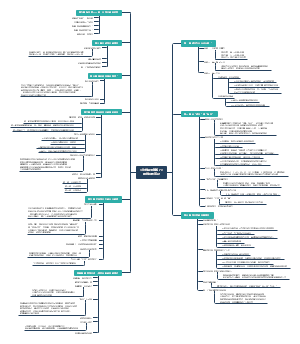

Concepts
Components
BitBake
BitBake is the tool at the heart of the OpenEmbedded build system and is responsible for parsing the Metadata, generating a list of tasks from it, and then executing those tasks. The most common usage for BitBake is bitbake packagename, where packagename is the name of the package you want to build (referred to as the "target"). The target often equates to the first part of a recipe's filename (e.g. "foo" for a recipe named foo_1.3.0-r0.bb). BitBake chooses the one selected by the distribution configuration. BitBake also tries to execute any dependent tasks first.
Recipes
Files that have the .bb suffix are "recipes" files. In general, a recipe contains information about a single piece of software. This information includes the location from which to download the unaltered source, any source patches to be applied to that source (if needed), which special configuration options to apply, how to compile the source files, and how to package the compiled output.
Classes
Class files (.bbclass) contain information that is useful to share between recipes files.
Configurations
The configuration files (.conf) define various configuration variables that govern the OpenEmbedded build process. These files fall into several areas that define machine configuration options, distribution configuration options, compiler tuning options, general common configuration options, and user configuration options in conf/local.conf, which is found in the Build Directory.
OpenEmbedded Build System

User Configuration
metadata you can use to control the build process. User configuration helps define the build. Through user configuration, you can tell BitBake the target architecture for which you are building the image, where to store downloaded source, and other build properties. 
local.conf
The local.conf file provides many basic variables that define a build environment. oe-init-build-env creates default build dir and conf files. It is important to understand that the OpenEmbedded build system reads the configuration files in a specific order: site.conf, auto.conf, and local.conf. And, the build system applies the normal assignment statement rules as described in the "Syntax and Operators" chapter of the BitBake User Manual. Because the files are parsed in a specific order, variable assignments for the same variable could be affected. For example, if the auto.conf file and the local.conf set variable1 to different values, because the build system parses local.conf after auto.conf, variable1 is assigned the value from the local.conf file.
MACHINE
Target Machine Selection
DL_DIR
Download Directory
SSTATE_DIR
Shared State Directory
TMPDIR
Build Output
DISTRO
Distribution Policy
PACKAGE_CLASSES
Packaging Format
SDKMACHINE
SDK Target Architecture
EXTRA_IMAGE_FEATURES
Extra Image Packages
bblayers.conf
The bblayers.conf file tells BitBake what layers you want considered during the build.
site.conf
You can use the conf/site.conf configuration file to configure multiple build directories. For example, suppose you had several build environments and they shared some common features. You can set these default build properties here. A good example is perhaps the packaging format to use through the PACKAGE_CLASSES variable. One useful scenario for using the conf/site.conf file is to extend your BBPATH variable to include the path to a conf/site.conf.
auto.conf
The file is usually created and written to by an autobuilder. The settings put into the file are typically the same as you would find in the conf/local.conf or the conf/site.conf files.
Metadata, Machine Configuration, and Policy Configuration
provide Metadata for the software, machine, and policies. 
Software Layer
.bb + Patches Software layers containing user-supplied recipe files, patches, and append files. The software layer provides the Metadata for additional software packages used during the build.
BSP Layer
Board Support Package (BSP) layers (i.e. "BSP Layer" in the following figure) providing machine-specific configurations. The BSP Layer provides machine configurations that target specific hardware. The BSP Layer's configuration directory contains configuration files for the machine (conf/machine/machine.conf) and, of course, the layer (conf/layer.conf). The remainder of the layer is dedicated to specific recipes by function: recipes-bsp, recipes-core, recipes-graphics, recipes-kernel, and so forth. Metadata can exist for multiple formfactors, graphics support systems, and so forth.
Distro Layer
Distribution Layers (i.e. "Distro Layer" in the following figure) providing top-level or general policies for the images or SDKs being built for a particular distribution. Best practices dictate that you isolate these types of configurations into their own layer. Settings you provide in conf/distro/distro.conf override similar settings that BitBake finds in your conf/local.conf file in the Build Directory.
classes
Class files (.bbclass) hold common functionality that can be shared among recipes in the distribution. When your recipes inherit a class, they take on the settings and functions for that class.
conf
This area holds configuration files for the layer (conf/layer.conf), the distribution (conf/distro/distro.conf), and any distribution-wide include files.
recipes-*
Recipes and append files that affect common functionality across the distribution. bb and patches files
Sources
The general workflow figure represents source files using the "Upstream Project Releases", "Local Projects", and "SCMs (optional)" boxes. BitBake uses the SRC_URI variable to point to source files regardless of their location. Each recipe must have a SRC_URI variable that points to the source. DL_DIR variable. This area is a cache that can hold previously downloaded source. You can also instruct the OpenEmbedded build system to create tarballs from Git repositories, which is not the default behavior, and store them in the DL_DIR by using the BB_GENERATE_MIRROR_TARBALLS variable. 
Upstream Project Releases
Upstream project releases exist anywhere in the form of an archived file (e.g. tarball or zip file). These files correspond to individual recipes. For example, the figure uses specific releases each for BusyBox, Qt, and Dbus. An archive file can be for any released product that can be built using a recipe.
Local Projects
Local projects are custom bits of software the user provides. These bits reside somewhere local to a project - perhaps a directory into which the user checks in items (e.g. a local directory containing a development source tree used by the group). The canonical method through which to include a local project is to use the externalsrc class to include that local project. You use either the local.conf or a recipe's append file to override or set the recipe to point to the local directory on your disk to pull in the whole source tree.
Source Control Managers
Another place the build system can get source files from is through an SCM such as Git or Subversion. In this case, a repository is cloned or checked out. The do_fetch task inside BitBake uses the SRC_URI variable and the argument's prefix to determine the correct fetcher module. When fetching a repository, BitBake uses the SRCREV variable to determine the specific revision from which to build.
Source Mirror
BitBake checks pre-mirrors before looking upstream for any source files.
Pre-mirrors
The PREMIRRORS and MIRRORS variables point to these, respectively. Pre-mirrors are appropriate when you have a shared directory that is not a directory defined by the DL_DIR variable. A Pre-mirror typically points to a shared directory that is local to your organization.
STAGING_DIR_TARGET
The PREMIRRORS and MIRRORS variables point to these, respectively. Regular mirrors can be any site across the Internet that is used as an alternative location for source code should the primary site not be functioning for some reason or another.
Images
The images produced by the build system are compressed forms of the root filesystem and are ready to boot on a target device. The build process writes images out to the Build Directory inside the tmp/deploy/images/machine/ folder as shown in the figure. This folder contains any files expected to be loaded on the target device. The DEPLOY_DIR variable points to the deploy directory, while the DEPLOY_DIR_IMAGE variable points to the appropriate directory containing images for the current configuration. 
kernel-image
A kernel binary file. The KERNEL_IMAGETYPE variable determines the naming scheme for the kernel image file. Depending on this variable, the file could begin with a variety of naming strings. The deploy/images/machine directory can contain multiple image files for the machine.
root-filesystem-image
Root filesystems for the target device (e.g. *.ext3 or *.bz2 files). The IMAGE_FSTYPES variable determines the root filesystem image type. The deploy/images/machine directory can contain multiple root filesystems for the machine.
kernel-modules
Tarballs that contain all the modules built for the kernel. Kernel module tarballs exist for legacy purposes and can be suppressed by setting the MODULE_TARBALL_DEPLOY variable to "0". The deploy/images/machine directory can contain multiple kernel module tarballs for the machine.
bootloaders
If applicable to the target machine, bootloaders supporting the image. The deploy/images/machine directory can contain multiple bootloaders for the machine.
symlinks
The deploy/images/machine folder contains a symbolic link that points to the most recently built file for each machine. These links might be useful for external scripts that need to obtain the latest version of each file.
Application Development SDK
The specific form of this output is a set of files that includes a self-extracting SDK installer (*.sh), host and target manifest files, and files used for SDK testing. When the SDK installer file is run, it installs the SDK. The SDK consists of a cross-development toolchain, a set of libraries and headers, and an SDK environment setup script. Running this installer essentially sets up your cross-development environment. You can think of the cross-toolchain as the "host" part because it runs on the SDK machine. You can think of the libraries and headers as the "target" part because they are built for the target hardware. The environment setup script is added so that you can initialize the environment before using the tools. All the output files for an SDK are written to the deploy/sdk folder inside the Build Directory as shown in the previous figure. Depending on the type of SDK, several variables exist that help configure these files. 
extensible SDK
standard SDK
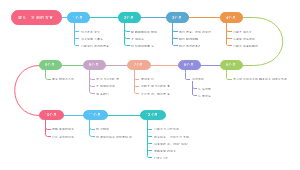
The OE Build System Workflow

fetch
The build system fetches and downloads the source code from the specified location. The build system supports standard methods such as tarballs or source code repositories systems such as Git.
patch
Once source code is downloaded, the build system extracts the sources into a local work area where patches are applied
config
Developers specify architecture, policies, patches and configuration details.
build
common steps for configuring and compiling the software are run.
install
The build system then installs the software into a temporary staging area where the binary package format you select (DEB, RPM, or IPK) is used to roll up the software.
check
Different QA and sanity checks run throughout entire build process.
pick
After the binaries are created, the build system generates a binary package feed that is used to create the final root file image.
output
The build system generates the file system image and a customized Extensible SDK (eSDSK) for application development in parallel.
Cross-Development Toolchain Generation
When you run BitBake to create an image, the OpenEmbedded build system uses the host gcc compiler to bootstrap a cross-compiler named gcc-cross. 
bitbake
gcc -> binutils-cross -> gcc-cross-initial -> linux-libc-headers -> glibc-initial -> glibc -> gcc-cross -> gcc-runtime
SDK
gcc -> binutils-crosssdk -> gcc-crosssdk-initial -> linux-libc-headers ->glibc-initial -> nativesdk-glibc -> gcc-crosssdk -> gcc-cross-canadian